If you’ve been applying to jobs, pitching clients, or trying to grow on LinkedIn and getting silence in return, the problem usually isn’t in your skills, it’s in your LinkedIn profile. Most LinkedIn profiles are half-finished: a decent headline, an empty About section, and a skills list nobody bothered to update since 2023.
This guide breaks down exactly how to improve your LinkedIn profile using the best practices to optimize your LinkedIn profile, section by section, whether you’re a recruiter magnet in the making, a job seeker trying to get noticed, a salesperson doing social selling, or a student building your first professional footprint. You’ll also learn how to do SEO of your LinkedIn profile so it actually shows up in search and how to use AI tools like ChatGPT and Claude to speed the whole process up.
Before the deep dive, here’s the checklist version which has LinkedIn profile optimization tips:
Now let’s go through each one properly.
Before anyone reads a word of your profile, they’ve already judged your photo. It’s the first filter people use to decide whether to keep scrolling or click in. A clean, professional photo is step one in how to make your LinkedIn profile attractive to anyone who lands on it.
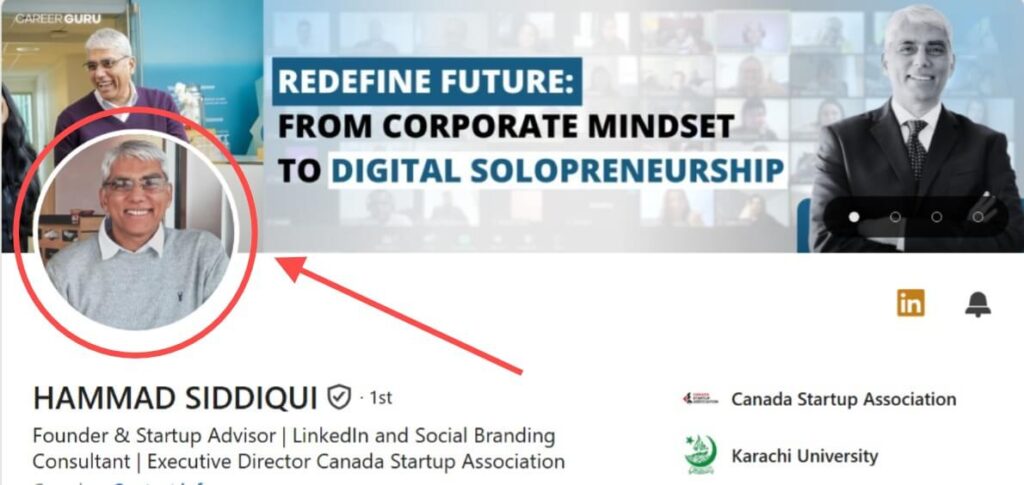
What actually works for this:
You can create your own picture by using AI models like ChatGPT, Open AI and Sora etc. First you have to give your picture on these AI models and refine or convert your picture in any professional styles which you want by prompts.
You’ve seen a large number of C-suite-level professionals like CEOs, CMOs, HODs, and CFOs have an impressive LinkedIn banner, which builds their authority in front of people when they land on their LinkedIn profiles. This is because the LinkedIn banner is the most essential part of your LinkedIn personal branding. It represents your skills and yourself what you have and who you are. It’ll position your profile as a good LinkedIn profile example.
Most people keep it generic, blank, or don’t update it.
These people have a good skill set, but they ignore this asset only because they haven’t used the best LinkedIn banner.
Here is the best LinkedIn banner for your guidance, which helps in building authority and gets noticed by people.

Generic LinkedIn banners often look like this:

To create a premium and effective LinkedIn banner, you can use creative tools like Canva, Adobe Express, Illustrator, and Photoshop.
In these tools, there are a lot of templates for LinkedIn banners. You can use one and design it with your creativity.
The size of the LinkedIn banner should be 1584 × 396 pixels with a 4:1 ratio, and it should be in JPEG or PNG format.
Every day, millions of people perform searches on LinkedIn, and every minute there is an opportunity to be discovered by candidates who already have well-optimized LinkedIn profiles.
If you only fix one thing on this list, make your LinkedIn headlines best. This is the single biggest lever for how to do SEO of your LinkedIn profile. LinkedIn’s own search algorithm weighs headline keywords heavily when recruiters, clients, or hiring managers search for talent. Recruiter search relies on exact keyword matches, so getting your headline right is central to how to optimize your LinkedIn profile for recruiters.
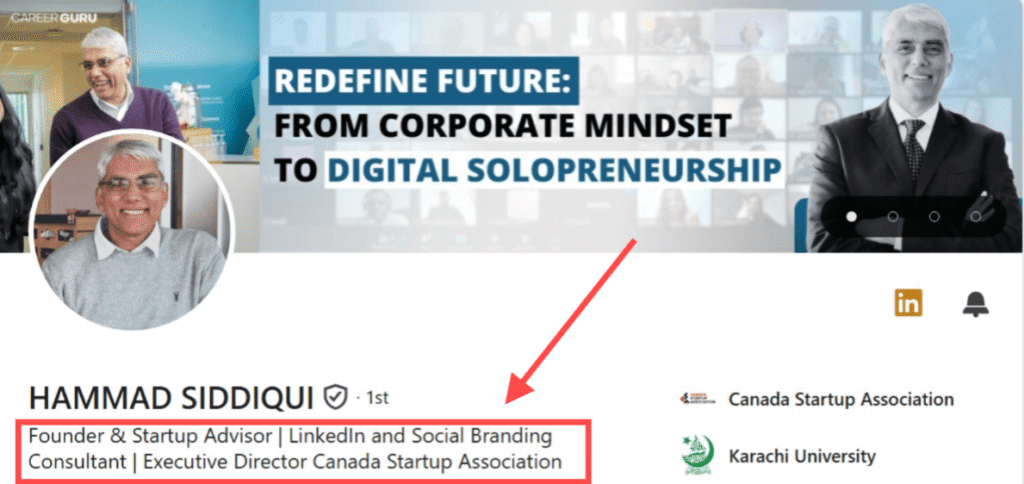
Most people waste this space on just their job title: “Marketing Manager at XYZ.” That’s not searchable, and it doesn’t tell anyone what you actually do or who you help.
If you want a fast starting point, here’s a simple Claude prompt to optimize your LinkedIn profile headline:
“Rewrite my LinkedIn headline to include my role, who I help, and one measurable result, under 220 characters.”
[What you do] + [Who you help / niche] + [Result or proof point]
Example: “Helping B2B SaaS founders generate qualified leads on LinkedIn | $3M+ revenue generated”
Keep it natural don’t stuff five job titles and ten skills into one line. Pick the 1–2 keywords your ideal audience is actually searching for (e.g., “Content Writer,” “Fractional CFO,” “B2B Growth Marketer”) and build the rest of the headline around proof and clarity.

The About section is an essential part of LinkedIn profile optimization. Most people often leave it empty or do not write about themselves. There is a 2,600-character limit for writing about yourself.
This is the turning point where a profile visitor becomes a client because your potential client reads your About summary and wants to know more about you who you are, where you are from, what you can do, where you learned your skills, how you started your journey, and what value you have generated for the businesses or startups you have worked with.
The About section is your introduction to your clients. Write it with your full attention and careful consideration.
What is the main asset in your About section that turns a profile visitor into a paying client?
a) Introduce yourself first by explaining who you are, what you can do, and your experience.
b) Write a brief note about your life before pursuing or entering your current field and explain why you chose it.
c) Explain how many obstacles you faced during your journey, how you learned your skills, and where you gained them. (Basically, in this section, you have to write a brief note about your skills. For example, if you are a B2B Marketer or Growth Marketer, you learned these skills from CXL, a well-reputed online institute.)
d) Explain which startups you have worked for, what responsibilities you managed, and what value you delivered.
e) Describe the experience you gained. (A short case study of your clients would be best.)
f) End with a CTA. Add a CTA that engages the reader or LinkedIn profile visitor by writing lines such as “Let’s Start Today,” “DM me for more information,” or “Let’s Connect and Solve Your Problem.”
In simple words, you have to write a story about yourself in the About section what you can do, what value you have delivered, what your aim is, and why. Answer these questions simply.
If you’re freelancing, consulting, or open to work, the Services section removes the guesswork. The LinkedIn Services section makes you unique from others and helps you optimize your LinkedIn profile. Services section basically defines the types of services you can provide.
When someone needs a service that you are already providing and have listed in your LinkedIn Services section, they perform a search. If your LinkedIn profile appears in front of them, they visit your profile and look at the services you are providing.
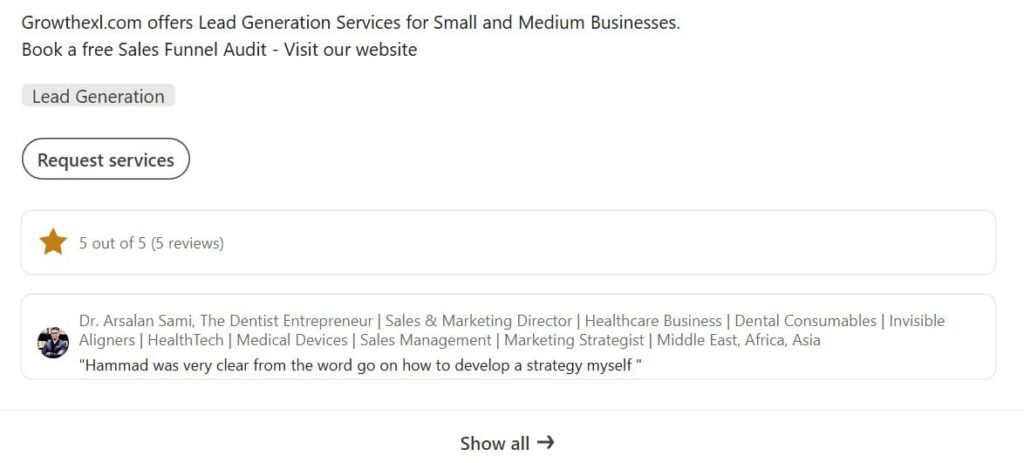
This is a short time and decision-making stage for hiring you or getting services from you. If you do not list your services, you will lose opportunities regularly because your services are not listed in your LinkedIn profile. It is one of the most important parts of LinkedIn profile optimization.
This is especially true if you’re optimizing your LinkedIn profile for sales the Services section is often the first thing a buyer checks before reaching out.
List the services that you can provide to others.
The LinkedIn Featured section is one of the best sections to showcase yourself with confidence because you can provide proof of your skills and work through images, links, or you can make case studies.
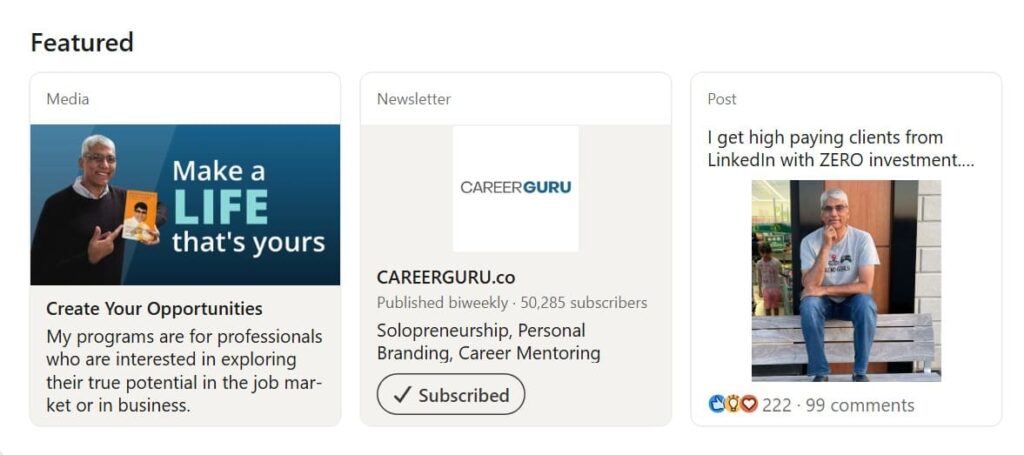
You can place case study screenshots or PDF files of any project that you have completed recently in the LinkedIn Featured section. It is a trust-building section.
When someone visits your LinkedIn profile with the intent to purchase a specific service and sees that you are the service provider with the proof they need, they will most likely message you and hire you.
You can also place a viral LinkedIn post in the Featured section or share a lesson that you have learned in your life or from other people.
So, the Featured section is one of the best sections that helps you whether you’re focused on optimizing your LinkedIn profile for job search or optimizing it for finding clients. Take advantage of this section it plays a vital role in LinkedIn profile optimization.
“How can I write the Experience section of my LinkedIn profile?” I often receive these types of messages. The Experience section is one of the most important sections of LinkedIn profile optimization or when you are building your LinkedIn profile.
“Why is the Experience section so important?”
The answer to this question is simple:
The Experience section is proof of your skills and professional journey. In the Experience section, you define your work journey, including which industry or company you have already worked with, what you did, which skills you gained and implemented there, how many years of experience you have, and for how many companies you have worked.
In simple terms, you have to clearly define your professional journey in the Experience section.
Adding company links to the Experience section makes your LinkedIn profile look more professional. Also, mentioning project links along with the skills you used on those projects will take your LinkedIn profile to another level. It builds your authority and trust on LinkedIn.
Only 20% of people complete this section accurately on LinkedIn. In this section, you have to define your current job title and whether you are still working there or have left.
Update it consistently whenever you start a new role or your job title changes at your workplace.
Education works like a solid badge on LinkedIn. It takes your LinkedIn profile to the next level.
It is very important because hiring managers, recruiters, and clients look at your education to see what qualifications you have and where you earned them. It is essential for many roles that you apply for because I have seen many job postings that require a bachelor’s degree in any field or a specific field.
For example, if there is a business management role and someone wants to hire a candidate, they will definitely look at the candidate’s qualifications to see if they have an MBA degree. If they do, the hiring manager is more likely to hire them because education builds natural trust for specific roles.
Not every role requires only a bachelor’s degree. Some roles also require an intermediate qualification or a graduate degree.
So, the main point is to add your education, including your school, college, institute, and university names, in the LinkedIn Education section.
Adding Licenses & Certifications also builds trust, just like your education. Add the licenses and certifications that you have earned while developing and learning your skills.
For example, if you complete a training course from CAREERGURU on how to build a personal brand on LinkedIn, you will receive a certificate in PDF or PNG format. You can add it to the LinkedIn Licenses & Certifications section and also mention the skills that you learned and gained from the course.
Doing this will give your profile an extra boost and increase your hiring chances.
LinkedIn has better features than many other social media platforms, and it also has a professional audience. LinkedIn helps us build a personal brand because it allows us to showcase our skills, experience, and achievements.
In the Projects section, you can add the projects that you have worked on. You can describe the project, how you managed it, what you did, the scope of work you performed, and the skill set you used.
You can include all of this information in the project description.
This is an important part of LinkedIn profile optimization. It builds trust, strengthens your authority, and positions you as an expert in your field. Don’t leave this section empty.
The Skills section matters a lot. Profile visitors look at the skills you have to determine whether they are relevant to your area of expertise. If they find any mismatch or have doubts about your skills, they may leave your profile.
In this section, you should list the skills that you have. Include your core skills that are relevant to your work and experience.
Recommendations are like feedback on the work you have done for your past clients. This section also plays an important role.
Most people look at your LinkedIn recommendations section to see whether you have any recommendations. If you do, they also check who wrote them. Was it a CEO, a Performance Marketer, a Coach, a Media Buyer, or someone else with authority in their field?
Recommendations increase your trust and credibility on LinkedIn. If you have worked with someone, ask them to write a LinkedIn recommendation for you.
When you create a LinkedIn profile, a generic URL is automatically assigned to your profile. When you share it with someone, it looks long and unprofessional.
To edit your LinkedIn profile URL, go to your profile and look at the top-right corner. You will find “Public Profile & URL.” Click on it and customize your URL using your name or professional title.
A customized LinkedIn URL also helps with profile indexing for SEO purposes and can improve your profile’s visibility in search results for recruiters and other professionals.
The steps above apply to everyone, but where you place your emphasis depends on what you’re optimizing your LinkedIn profile for.
Recruiters search LinkedIn using specific job-title and skill keywords. Make sure your headline and top skills match the exact terms recruiters in your field search for not creative alternatives. Turn on “Open to Work” (visible to recruiters only, if you’d rather keep it private) and keep your location and industry fields accurate, since recruiter search filters rely heavily on both.
Beyond keywords, job-search-focused profiles benefit from a tight, outcome-driven Experience section and an About section that reads like a pitch, not a diary. Recruiters skim the first two lines of your About section and need to hook attention fast. You can learn more about it here.
If you’re in sales, your profile is a landing page. Your headline should speak to the problem you solve for your buyer, not your title. Use the Featured section for case studies and testimonials, and do post on LinkedIn consistently an optimized profile with no activity still underperforms than an average profile that’s active.
Get 365 ideas about LinkedIn post creation which perform well.
If you don’t have much work experience yet, lean on Projects, coursework, and certifications instead. List internships, class projects, and volunteer work with the same “what did you actually do” framing used in the Experience section activity and initiative matter more than tenure at this stage.
AI tools are genuinely useful. Don’t use them for writing your entire profile word-for-word (that tends to read generically), but for structuring your thinking and tightening your language.
A Claude/ChatGPT prompt to optimize your LinkedIn headline:
“I’m a [your role] who helps [who you help] achieve [result]. Write 5 LinkedIn headline options under 220 characters that are keyword-rich, avoid buzzwords like ‘passionate’ or ‘synergy,’ and include a specific outcome or proof point.”
A prompt to help draft your About section:
“Based on this background: [paste your role, key experience, and one result], write a LinkedIn About section in first person, conversational tone, structured as: hook, brief background, key skills with proof, and a closing CTA. Keep it under 2,000 characters.”
Use the AI output as a first draft, then edit it in your own voice profiles that sound like an actual person wrote them. Because AI-generated tends to underperform ones.
Strong profiles across different industries tend to share the same traits, regardless of niche:
Before you rebuild everything, it helps to know exactly what’s underperforming. LinkedIn give free profile audit tool that scores your profile against the checklist above and flags the specific sections costing you visibility or credibility.